


A software rollout requires more than just documentation

A rollout appears clearly structured in the project plan: workshops, tests, training, go-live. Every step has its place. The critical moment lies elsewhere.
It begins when employees work alone with new or modified software for the first time. A transaction looks different. A process follows a new logic. A field does not behave as expected.
You know that there is documentation for this. A process description. A presentation from the training. Maybe a document in the project folder. But at this moment, it's not about documents. It's about orientation. About a quick, reliable answer in the ongoing work process.
Many transformation projects fail not because of a lack of knowledge. They fail because knowledge is not available at the crucial moment.
The problem: knowledge spreads faster than it can be maintained
Large transformation projects rarely proceed in a linear fashion. Development, testing, training, change measures, and communication run parallel to each other. While one team is still configuring, another is already preparing training sessions.
Documentation inevitably lags behind. Only when a process has been technically implemented and agreed upon can it be described in a binding manner. However, the need for guidance arises much earlier.
In addition, each department adapts processes within its area of responsibility. At the same time, the processes are interlinked. Without a common approach, it is impossible to create a consistent picture.
And processes do not remain stable during a rollout. Fields change, mandatory information is added, roles are redefined, and authorizations are adjusted. When teams document these changes in traditional file storage systems, multiple versions of the same instructions quickly emerge.
The problem is therefore rarely a lack of documentation. It is the lack of a connection between process changes, the system environment, and valid sources of knowledge.
The cause : 3 structural reasons
When knowledge remains intangible in rollouts, it is rarely due to a lack of commitment. In many projects, teams work under high pressure and deliver enormous amounts of content in a short period of time.
The problem arises because three structural factors come together.
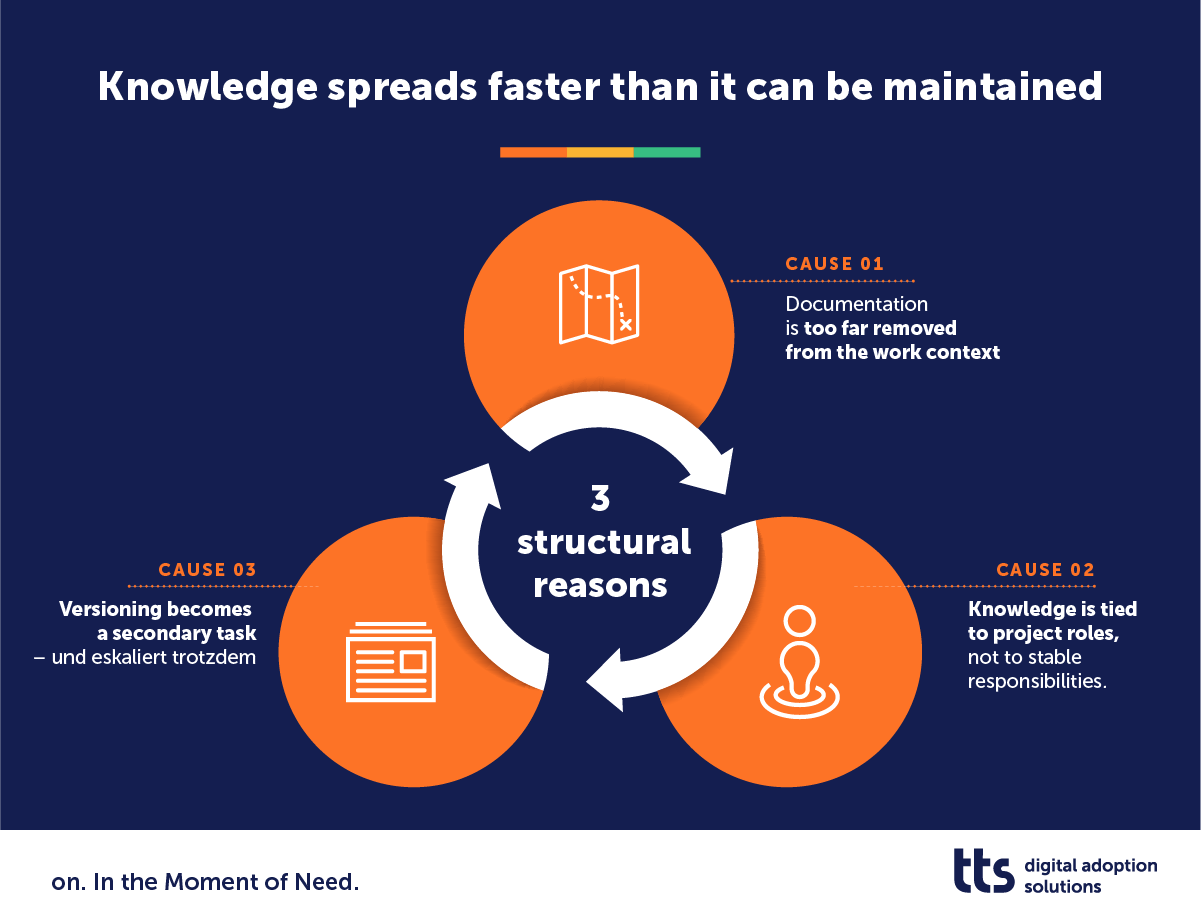
Cause 1: Documentation is too far removed from the work context
Many teams create training materials in Word, PowerPoint, or as screenshot documents. At first glance, this seems pragmatic. However, the more complex the processes become, the greater the effort required.
At the same time, there is an increased risk that individual steps will be missing or will no longer match the system status. This is precisely why many organizations are looking for ways to create and maintain documentation that is closer to the actual use of the system.
Cause 2: Knowledge is tied to project roles, not to stable responsibilities
New roles emerge in the project: key users, process experts, testers, trainers. These people have knowledge that no one else has.
But projects end. Roles change. Key users return to their line tasks. In practice, it often remains unclear who will update content after go-live.
A change manager from a large ERP program describes this challenge precisely: It is difficult to retain key users as authors in the long term. It only works if the scope per person remains clear and responsibilities are assigned in a comprehensible manner.
Cause 3: Versioning becomes a secondary task – and still escalates
When processes change, the documentation must follow suit. This does not happen once, but continuously.
Many teams try to solve this problem with traditional file storage. In practice, this quickly leads to parallel versions. A document is copied, adapted, forwarded. Shortly thereafter, several variants exist.
At that moment, the company not only loses track of things. It loses trust: users no longer know which instructions apply. And they stop actively seeking help.
The effects: uncertainty in the workflow
If knowledge remains intangible during rollout, it doesn't create one big problem. It creates many small frictional losses. And it is precisely this friction that adds up.
Employees waste time searching for information that already exists. They open folder structures, ask colleagues, search chats, or try out steps. Often this happens multiple times – for the same questions.
At the same time, uncertainty grows. Those who are unsure whether instructions are still correct fall back on habits. This is especially true in processes that span multiple systems. One wrong step then not only has a local impact, but can also lead to subsequent errors.
Support teams also feel these effects. Many tickets are not created because systems are “broken.” They are created because users cannot find quick, reliable guidance. Technical support then becomes a substitute for a lack of access to knowledge.
In addition, many organizations have rising expectations of AI. Chatbots and internal GPT systems are supposed to answer questions and make knowledge more accessible. But without clear governance and reliable sources, this remains risky. AI can only use information as well as it is maintained and clearly provided.
The end result is a paradoxical picture: there is more content than ever before, yet its actual usability in everyday life is declining.
The turning point: What works in practice
Companies that stabilize knowledge transfer in transformation projects are not pursuing a radically new approach. They are changing the basic assumptions.
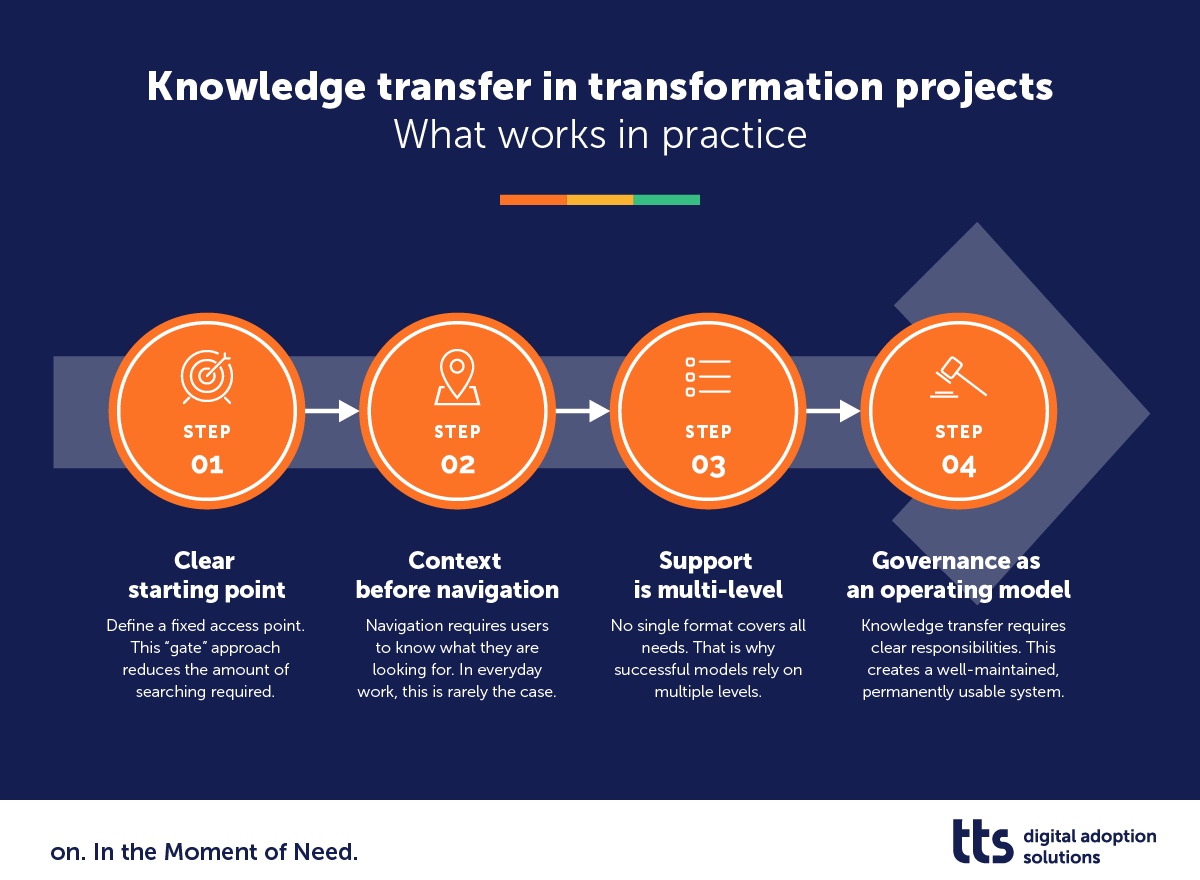
1. A clear entry point instead of multiple sources
Instead of distributing documentation across project folders, Teams channels, and drives, define a fixed access point. Regardless of whether someone is working in an ERP system, an Office application, or an HR tool, the path to help remains the same.
This “gate” approach reduces the amount of searching required. Employees don't have to think about where content is located. They know where to start.
2. Context before navigation
Navigation requires users to know what they are looking for. In everyday work, this is rarely the case.
Organizations that are making progress in this area link support directly to the application context. When you open a specific transaction, you see relevant content. When you perform a process step, you receive targeted instructions.
The difference is crucial: it is not the folder that structures the knowledge, but the actual usage situation.
3. Support is multi-level
No single format covers all needs. That's why successful models rely on multiple levels:
- contextual hints and step-by-step instructions
- a search function for specific questions
- supplementary AI-based support that refers to verified content
- direct referral to technical support if necessary
The individual technology is not the decisive factor. What is decisive is the logical sequence: first orientation, then deepening, then escalation.
4. Governance as an operating model
Knowledge transfer does not end with the go-live. It requires clear responsibilities. Successful organizations therefore appoint people responsible for content and maintenance. They keep the scope per author manageable and combine technical process responsibility with documentation responsibility.
This results in a well-maintained, permanently usable system rather than a one-off project artifact.
Start before everything is perfect
A common mistake in transformation projects is the demand for completeness. Only when all processes have been documented, all roles clarified, and all content checked should the central knowledge access go live.
In practice, this delays the actual benefits.
Successful organizations take a different approach. They start with a clearly defined core: a system, a few prioritized processes, and a manageable group of authors. They accept that content will grow and change. What is important is not complete coverage on day one, but a reliable starting point.
An experienced change manager from a large ERP rollout put it bluntly: You have to start somewhere. If you wait for the perfect starting point, you'll never get started.
With stable access, clear responsibilities, and a transparent maintenance process, a robust knowledge system is created step by step. It develops parallel to the rollout – not after it.
Conclusion: From project knowledge to working reality
Transformation projects rarely fail due to a lack of knowledge. They fail because knowledge is not available in the workflow.
If you want to solve this problem, you don't need to produce more documents. What is crucial is a clear starting point, context-related support, and a maintenance process that keeps pace with changes in the system.
This turns project knowledge into a reliable component of daily work. And only then can AI systems unleash their potential—because they have access to verified content and clear structures.
FAQ: Frequently asked questions
Isn't centralized knowledge access just a document management system?
No. A document management system organizes files. Centralized knowledge access ensures that content is available in the work context—regardless of where it is stored.
Isn't a good search function enough?
Searching requires users to know what they are looking for. In everyday work, this clarity is often lacking. Contextual support reduces this effort.
Can't AI solve this problem automatically?
AI can make content more accessible. However, it is no substitute for governance and reliable sources.
Does this require an immediate change across the entire company?
No. Many organizations start with a clearly defined area and gradually expand central access.


